
/ Online Vocal Remover Editorial
What Is a MIDI File?
A MIDI file is a set of playback instructions: which notes to play, when to play them, how long to hold them, and how strongly to play them. It is not recorded sound. Think of it as digital sheet music that a computer, keyboard, or music app performs with its own instrument sounds.
What Is a MIDI File Made Of?
A MIDI file stores musical events rather than a finished waveform. That distinction explains why the same file can sound like a piano on one device and a synthesizer on another. It also explains why MIDI files are so useful for editing: you can change a note, its timing, or its velocity without cutting up recorded audio. The MIDI Association’s reference describes the standard in more technical detail, but the practical idea is simple: MIDI tells a compatible instrument what to perform.
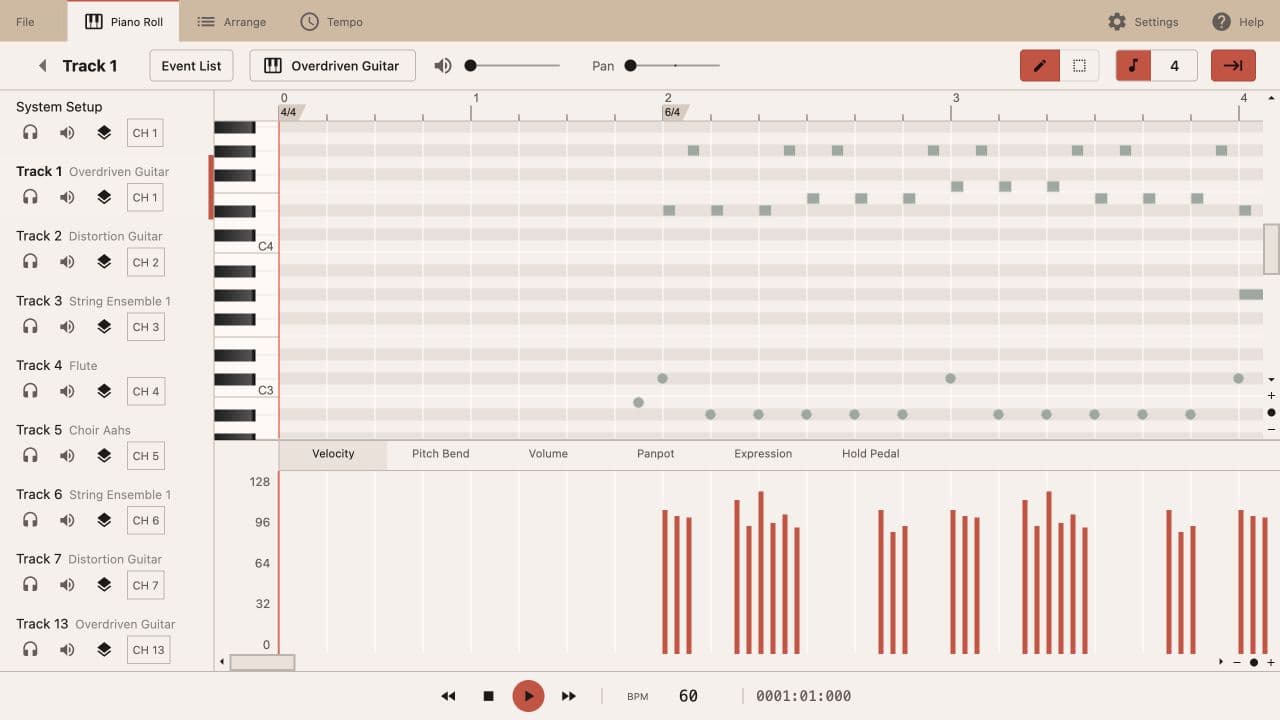
The file extension does not change that basic idea. A MIDI file can end in .mid or .midi, and both extensions normally point to the same type of musical instruction data. What matters is the content inside: note events, timing information, tempo changes, controller values, and track organization. A file can be tiny because it stores descriptions of notes instead of every audio sample needed to reproduce a recording.
- Notes: pitch, start position, duration, and release.
- Velocity: how strongly each note is triggered.
- Timing and tempo: when events happen and how fast beats pass.
- Tracks and channels: how parts are grouped and routed to instruments.
- Program and controller events: instrument suggestions, volume, pan, sustain, and expression.
A note event usually includes a MIDI pitch number, a position measured in ticks or beats, a duration, and a velocity value. Pitch identifies the note; duration determines how long it remains active; velocity describes the attack level. Velocity is not the same as the final volume of a mix. A sampler or synthesizer may use it to change loudness, tone, or articulation, depending on its sound design.
Tempo events describe the relationship between beats and seconds. If a MIDI file contains a tempo change, a player can speed up or slow down while the note positions remain musical. Tracks and channels provide another layer of organization. A track might hold a melody, bass line, or percussion part, while a channel tells a compatible device how to route events. Not every application interprets every event in exactly the same way, so an imported file can sound slightly different across players.
Some files also contain program-change events that suggest a General MIDI instrument, plus controller events for volume, pan, sustain, modulation, or expression. These are still instructions. They do not embed the sampled piano, guitar, or drum kit. The receiving software supplies the sound, which is why a MIDI file can be edited at the note level and re-rendered with a different instrument later.
Timing resolution is another reason two applications can show the same performance differently. MIDI files commonly divide a quarter note into a number of ticks, often called pulses per quarter note. A higher resolution gives an editor more positions between beats, but it does not make a loose performance automatically accurate. Quantization can move events toward a grid, while humanization deliberately leaves small timing differences in place. When you inspect a file, distinguish the stored position from the tempo used to play it: changing BPM changes the clock, not necessarily the note pattern.
MIDI vs MP3: Instructions Versus Recorded Sound
An MP3 works in the opposite way. It stores compressed audio: a fixed stream of samples that already combines the singer, instruments, effects, room sound, and mastering decisions. The file can be played without choosing a new instrument because the sound is already printed into it. Editing an MP3 generally means processing that combined waveform, while editing MIDI means changing the instructions before a sound engine performs them.
| Feature | MIDI | MP3 |
|---|---|---|
| What is stored | Musical instructions and events | Recorded, compressed audio |
| Typical size | Often measured in kilobytes | Usually measured in megabytes |
| Can you change notes? | Yes, directly | Not cleanly; notes are mixed into the waveform |
| Does it contain a fixed sound? | No; the player supplies instruments | Yes; the rendered sound is part of the file |
| What affects playback? | The receiving synth, sampler, or app | Mostly the player and codec support |
Audio rendered from MIDI with a browser piano
This WAV is a fixed audio rendering of the note instructions with a simple browser-piano sound.
The same MIDI notes rendered as a fixed MP3 synth track
This MP3 is another fixed audio rendering of the same short melody with a synth-like tone.
Both players load fixed audio files; neither loads a .mid file directly. The two examples use the same musical outline, but they do not behave the same way. Change the MIDI instrument before rendering and the playback tone changes. Change the MP3 instrument and there is no original instrument event left to edit—the synth sound has already been rendered. Audio can also be converted into MIDI, but that process has to estimate notes from sound rather than recover an untouched instruction file.
How Do You Open and Play a MIDI File?
The quickest no-install answer to “how do I open a MIDI file?” is to play a MIDI file in your browser with a web editor. This is useful when you want to inspect notes, try playback, or make a small correction without installing a DAW. Browser playback still depends on the app’s sound engine, so it may not match the instrument you hear in a desktop project.
Desktop DAWs such as Ableton Live, Logic Pro, FL Studio, Cubase, and Reaper offer deeper MIDI routing, virtual instruments, automation, and mixing. Dedicated notation programs and hardware keyboards can open MIDI too. Use a DAW when you need a full arrangement or final audio; use a browser editor when the task is simply to hear, inspect, or adjust the underlying note data.
Three Ways to Make a MIDI File
There are three practical ways to make a MIDI file. The first is to generate MIDI from a text prompt. An AI MIDI generator can turn a short description into a compact melody sketch. You choose a musical direction and parameters such as tempo, key, and length, then listen before deciding whether the idea is worth developing. This is useful for a starting motif, a practice phrase, or a quick experiment. The output is a melody draft, not a finished arrangement, so chords, drums, and sound design remain later decisions.
The second route is to turn an audio idea into MIDI. A converter analyzes a recording and estimates note pitches, timing, and strength. It works best when the source has one clear melodic line, such as a vocal, humming, piano, or guitar phrase. A dense mix can produce extra notes because several parts overlap. Treat the result as detected musical data that may need cleanup, not as a perfect copy of the recording’s instrument or performance.
The third route is to draw notes yourself. Start with an empty piano roll, place notes at the pitches and beat positions you want, adjust their durations, and audition the phrase. This method takes longer than starting from a prompt or a recording, but it gives you direct control over every event. It is a good fit for a short exercise, a bass idea, or a melody you already hear clearly.
How Audio and MIDI Conversion Works
When you convert between audio and MIDI, remember that the direction changes what can be preserved. An MP3 to MIDI converter can estimate a melody from a recording, but it cannot recover the original MIDI events, instrument patches, or every hidden part in a finished mix. Clean, melodic sources usually give the clearest detection. After conversion, listen to the notes, remove obvious false detections, and check timing before using the file in a larger project.
MIDI can also become audio, but that is rendering rather than a reversible conversion. A DAW or MIDI player sends the events to a virtual instrument, records the resulting sound, and exports a waveform such as WAV or MP3. Once rendered, the audio contains the instrument’s performance as sound; changing one note cleanly is no longer the same simple event edit.
What Are MIDI Files Used For?
People use MIDI files for karaoke backing tracks, music lessons, transcription, arranging, covers, remixes, and production sketches. A student can slow a phrase down or isolate a part. A producer can move a bass note, change a chord voicing, or send the same pattern to a new synth. A songwriter can keep a melody separate from the final recording and revise it while the arrangement changes.
For a cover or remix workflow, MIDI is often a bridge between listening and rebuilding. You can use it to study the contour of a vocal line, prepare a guide part, or test a new accompaniment. If the source is a complete song and you first need a cleaner vocal or instrumental reference, you can separate vocals and instrumental audio first before sending the clearest melodic part to an audio-to-MIDI workflow. Always check the rights for the song and the intended use before publishing or distributing a transcription.
MIDI itself does not make a song royalty-free. The format has no blanket copyright license. An original MIDI arrangement may belong to its creator, while a transcription of a protected composition can still involve the underlying songwriter’s rights. Home practice and private study are different from publishing, monetizing, selling, or syncing a file to video. When in doubt, get permission or use material you are allowed to reproduce.
MIDI File Questions
What does MIDI stand for?
MIDI stands for Musical Instrument Digital Interface. It is a standard for sending musical performance instructions between instruments, computers, and music software.
Is a MIDI file an audio file?
No. A MIDI file stores events such as notes, timing, velocity, tempo, and controller data. A player or virtual instrument turns those instructions into sound.
Does a MIDI file contain sound?
No. It does not contain recorded piano, guitar, vocal, or drum audio. The receiving app or hardware supplies the instrument sound used for playback.
What is the difference between .mid and .midi?
In normal use, .mid and .midi are two filename extensions for the same MIDI file format. The extension alone does not change the musical data inside.
Are MIDI files royalty-free?
Not automatically. MIDI is a file format, not a copyright license. Original arrangements may be protected, and a MIDI transcription of a copyrighted song can still require permission for some uses.
Can you convert MP3 to MIDI?
Yes, an audio-to-MIDI tool can estimate notes from an MP3 or another recording. Results are usually clearest with a clean, melodic source; dense mixes and effects can create extra or missing notes.
How can I open a MIDI file without installing software?
Use an online MIDI editor that can load .mid or .midi files in your browser. You can then play the file, inspect its piano roll, and make small edits without installing a desktop program.